Blood Glucose Monitor (BGM) Warranty Program
Patients may be eligible to receive a Blood Glucose Monitor (BGM) from the pharmacy, free of charge with the purchase of test strips. These monitors must be processed through Nexxsys.
There are three parts that must be completed when processing a BGM through Nexxsys:
- Add the proper bill code to the Patient Folder.
- Fill the BGM as a new prescription.
- Process the BGM for pick up.
Part 1: Adding the Proper Bill Code
To give a free BGM to a patient, it must be billed to a bill code specific to BGMs.
To add the proper bill code:
- Search for and select the correct patient.
- Select the 3rd Party tab.
- Select Add. The Third Party Plan Search window appears.
- In the Bill Code field, enter the bill code as per the Telus BGM Bill Code Table*.
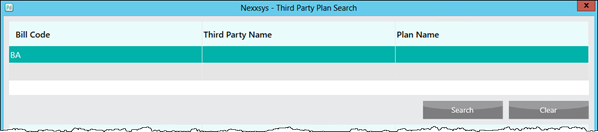
- Select Search. Matching results display in the bottom portion of the window.

- Highlight the appropriate third party.
- Select OK. The Third Party Plan Search window closes and the third party is added to the 3rd Party tab.
- Select Save.
- Proceed to Part 2: Filling the BGM as a New Prescription.
Part 2: Filling the BGM as a New Prescription
To fill the BGM as a new prescription:
- Select the Profile tab.
- Select New. A blank New RX window appears.
- Enter the following information:
- Drug(s) - DIN or name of the BGM as per the Telus BGM Bill Code Table*.
- Doctor - the pharmacist's name.
- QA, Qty and DS - 1.
- SIG - SN followed by the serial number of the meter.
- Ready time
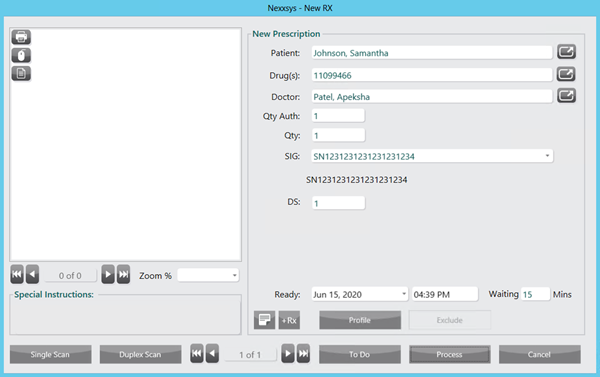
- Select Process. The Rx Detail window appears.
- Select Fill to process the prescription.
- Proceed to Part 3: Processing the BGM for Pick Up.
Part 3: Processing the BGM for Pick Up
To process the BGM for pick up:
- Affix the hardcopy patient label to the BGM box.
- Affix the privacy label to the BGM warranty card using the card from within the BGM box.
- If the patient is not waiting, attach the BGM warranty card to the outside of the bag and place in the will-call basket.
- The warranty card must be completed when the patient arrives.
- Scan the BGM warranty card Patient Folder.
- Provide the BGM to the patient and put the completed warranty card into the BGM envelope.
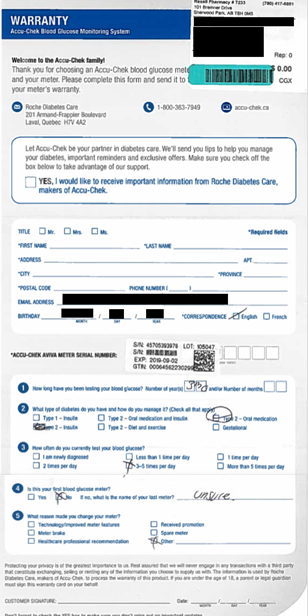
The provided BGM envelope is to be sent via mailbag to the Rexall Support Centre (RSC) at the end of every fiscal period. Your pharmacy will receive 1 envelope for each fiscal period with the appropriate date to be sent to the RSC.
The BGM warranty card envelope contains confidential patient information and must be kept in a secure and locked location like the narcotic safe. If not possible, and there are no locked drawers within the pharmacy then store in the locked office.